Tuesday, July 14, 2015

Memory Error Plus

MEMORY ERROR 

The insrtuction at 0x5cda630a refferanced memory at 0x0000003d the memory could not be read


This particular Error only occurs when you shut down your computer 

Let me make this clear for everyone. 
The ONLY part of this lengthy Error that holds any importance is (0x0000003d) if you were to look it up to find this fix on your own. 
Hey NO worries I have done the leg work just for you! 

There are NO special tools to fix this one! No not one! 

Windows provides its own just for you! 

CHKDSK is the answer!

WINDOWS Steps; Click on My Computer (C:) Then Click Properties next follow screen shots. 


Once CHKDSK has finished problem solved! 


Spoiler ALERT!  

Monday, June 29, 2015

Windows 10

Windows 10 Testing

Good day everyone!
Today I just threw -up my arms and said what the heck!
I installed Windows 10 preview to giver a go so far so good.
Most laptops will get a new windows icon on the lower right corner by the (time and date) I did not get it on my desktop.
Also you will need to note; it only appears if you have your Windows updates turned on.
 
In my situation it took 6 hours to completely install and set-up my system. I'm sure you will not have this issue on a laptop.
 
Microsoft did this for Window 8 release. Their attempt for this launch was dismal for desktop computers.
Guys Windows 10 is testing out GREAT for all users of this software by the end of July I suspect we will have most or all of the kinks worked out. There are a lot of new and improved function within the software and my favorite is "I'm Cortana."
In order to use this function you will need a cam with a built in mic (preferred) or a headset she is voice active. Laptops today come video came ready so no worries. 
For anyone who will attempt the download of this new version I HIFGHLY recommend backing up all your photos, document files, music or any other import information to you before you begin the download of Windows 10.
When you back up I would also like to suggest that you get USB flash drives 8gig to 16gig+ to put all you information on, then all you need to do is load it back onto your computer when you have finish the download of Windows 10.
 
If you would like you can purchase your USB Flash drives here before you begin.
 
Always make your own backups~

Sunday, March 15, 2015

Sundays

Welcome to my BLOG 3/15/2015 CRAYZNESS
Today I have spent  a good portion of my day looking for FANTASTIC tools  the help everyone with bettering their performance and fixing issues.
Let be clear I have used all the free version of these software platforms and have tested them using both the full versions and *Free versions for my self so I give you the best of these software tools.
NOTE: If you like these tolls and want more bells and whistle it will cost $$ this I will leave totally  up to you! But all of them are TOP notch!

Here is were you can read and downland all free version of these system tools.
THEY BEGIN HERE:
Top Free Software Picks: System Maintenance Utilities:
Auslogics Disk Defrag Free

Windows


Soluto
Windows

Soluto is a little different from the rest—it's more of an IT tool you use to manage up to three computers (such as your parent's or kids' PCs). It's all cloud-based and you can pay a monthly fee to manage a lot more than three computers. Even then Soluto doesn't let you do a big cleanup of a PC like other utilities here, but it will give you a lot of information on what's happening in each system and help you do some upgrades to select pieces of software.


Eraser
Windows

Eraser doesn't tune up Windows as much as it clears the way for your hard drive to work better. It does this by over-writing the "empty" areas of a drive you thought were deleted. Even if you empty the recycle bin, the data might still be recoverable, for example. Eraser makes sure it isn't, and that also helps with hard disk performance.


Glary Utilities
Windows ' Android

The free version of Glary Utilities (the Pro edition is $40) offers "one-click maintenance of a PC. You pick all the functions you want to run, click once, and the utility does the work. The Android version is much the same. You have to run it manually, only the Pro edition works in the background. The utility works great, just beware when you install it on Windows, the check boxes will try to get you to install a toolbar that will take over the search on your browser.


JetClean and JetBoost
Windows

JetClean would put itself up against CCleaner and SystemCare and others any day. It offers a complete performance enhancing clean and registry fixes all from one light piece of software. Couple it with JetBoost to get even better performance—JetBoost will shut down everything but your most essential apps, at least temporarily, something many gamers will appreciate.


Speccy
Windows

Speccy won't clean up a thing, but this handy utility from Piriform will give you plenty of one thing:  Information. Speccy looks at your PC's internal systems and provides a report on exactly what you're running—processor, drives, RAM, graphics, OS – all info you'll have on hand when needed. It's invaluable when making tech support calls. 


Advanced SystemCare 7 Free
Windows

Not too many products try to take on the mash-up of system maintenance and malware/virus monitoring, but IObit takes on that task with SystemCare. Even this free version (Pro is $20 for 1 year for 3 PCs) offers basic protection, basic optimization, and automatic privacy cleaning whenever you log in. Check out PCMag's review of version 6. Mac users might want to check out IObit's MacBooster.


Iolo System Mechanic Free
Windows
Don't be thrown off by the price on the linked page: System Mechanic Free is still free, but it is a stripped down version of the more powerful $40 version. For what you get, however, Windows XP to Windows 8 users will be pleased: there's a registry tuner, startup optimizer, PC cleanup, shortcut repair tool, even a fix for bad Internet connections.

Look for more NEW and innovating ways to keep you Computers and Laptops running more efficiently check back and SHARE with others. 

Friday, December 12, 2014

CHA CHING

Cash-In 

Finding the right tools to get the job done can be frustrating and costly! 
There are many ways you can go about keep your computer system maintained.
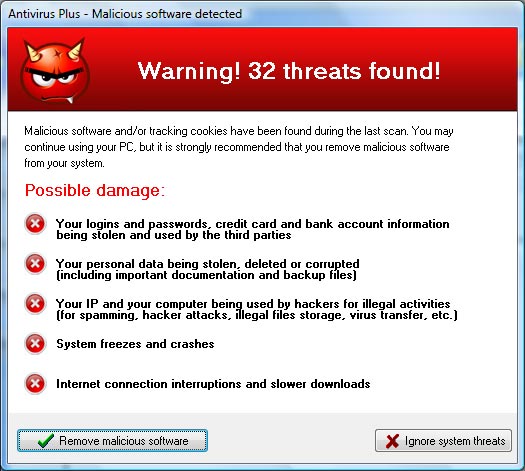
First are the guys who want you to pay them monthly to use there online software, for instance Softonic is just one of many who give you software that will seek out configuration errors on you system then for a fee you can clean up your system. 
There are others who use adds that will tell you your system is running slow and needs cleaning. They look like this.


 WAIT! 
Before you take action truly give me your first call. (541) 791-6854 
There are many services bidding for you patronage and they use what ever tactics necessary to get your money and hooked into a monthly service fee.

TIP for today! 
If you are a Vista, Windows 7 or Windows 8 or higher user these new system are recovery friendly! They also have there own Virus and malware tools built-in! NO MORE WORRIES... 

Here is the Windows security program already built in! 


What you will need to know is how to turn it ON. Is this software program a good way to keep your system from getting viruses and malware YES! 


TURN IT ON TODAY!


Tuesday, October 28, 2014

A BAD MOVE

MICROSOFT IS AT IT AGAIN 

Microsoft will no longer sell computers with Windows 7 installed starting the 31st of October this year, which is next Friday. Retail sales of Windows 7 already ended on the same date last year. After next Friday only Windows 8.1 will be available to the consumer market.

Wait HOLD ON Windows 8.1 is undergoing an upgrade to Windows 10 (TEN). How stupid is this that they are no longer going to offer windows 7...


Saturday, August 9, 2014

FLASH D+

WOW I found an very amazing place yesterday! 
Had to get this out! 

If you have a USB FLASH DRIVE Stick and it quits working or you have a hard drive that no longer functions WAIT STOP before you take drastic measures give these guys your first CALL!    

Phone Local 503-926-6098 or 1-866-221-3111

I spent some very quality time with their online service tech extremely knowledgeable and helpful! Their procedures are exactly like the ones that I use to perform my maintenance service for your PC.
Guys recovery is changing! 
Let just say this, when your service is accessible online why in the world would you take time to get in your car and waist your gas to drive to a repair shop when this service can be performed on your Computer Online.   

Guys I would like your feedback on this one! IF you know of someone who has been looking for a place to recover their USB  FLASH DRIVE or HARD DRIVE you have found the right place! SHARE 

Need your input on this please leave your comment in the form below this is something that in very unique and may have a use for.

Wednesday, July 16, 2014

There is a new Dragon in town

Comodo Dragon


Here is a new browsers to me any way! It is a bit on the darker side which I like it renders just as quickly as some of the top names in the industry like Google Chrome, Firefox, Windows IE Explorer and Opera. This browser is built by Chromium which is the same group who develop Google chrome how ever this has more bang for the buck more secure much faster and no headaches at least foe me that is! Here are some snap shots of this browser and I have included a link so you can download it to give you best run.    
 Download 


FREE tech information for your downloading Comodo Dragon today.  
If you are a Windows XP PRO and Home users and you have created a user account and forgot your log-in password here is how to recover you account and remove or change the password. 

Steps

  1. Turn off computer if it is not off already as it is turning on tap F8 key while turning on, this will put into a new window chose SAFE MODE using the arrow keys on your keyboard. 
  2. You will see your USER account listed and ADMINISTRATOR Click ADMINISTRATOR
  3. Open CONTROL PANEL
  4. Go to USER ACCOUNTS
  5. Open your user account REMOVE PASSWORD 
  6. Turn computer off or restart.
This will take time depending on your computer. 
For more technical help please visit  OnlinePCMaintenance